
📚 Mondosol Help Center
Find answers to all your questions about our coaching, courses, and services
Business & Coaching
Master global business success through expert multilingual coaching and the Power Hour Method
1 articleLearning & Education
Master languages faster through cultural immersion and innovative education approaches
11 articlesTravel & Accommodation
Professional travel and accommodation services for educational experiences
16 articlesBooking & Reservations
Streamline your booking and reservation experience with expert guidance
13 articlesGuest Posting
Share your expertise in travel, education, and personal development
6 articlesAffiliate Program
Join our lucrative affiliate program with 50% commissions and €2 sign-up bonus
Coming soonPricing & Payments
Transparent pricing structure for all educational services
1 articlePlatform & Support
Comprehensive support for account management and technical assistance
1 articleAbout Mondosol
Discover our mission to transform global learning through innovative education
Coming soon🔥 Most Popular Questions
Learning & Education (2)
Content & Resources (2)
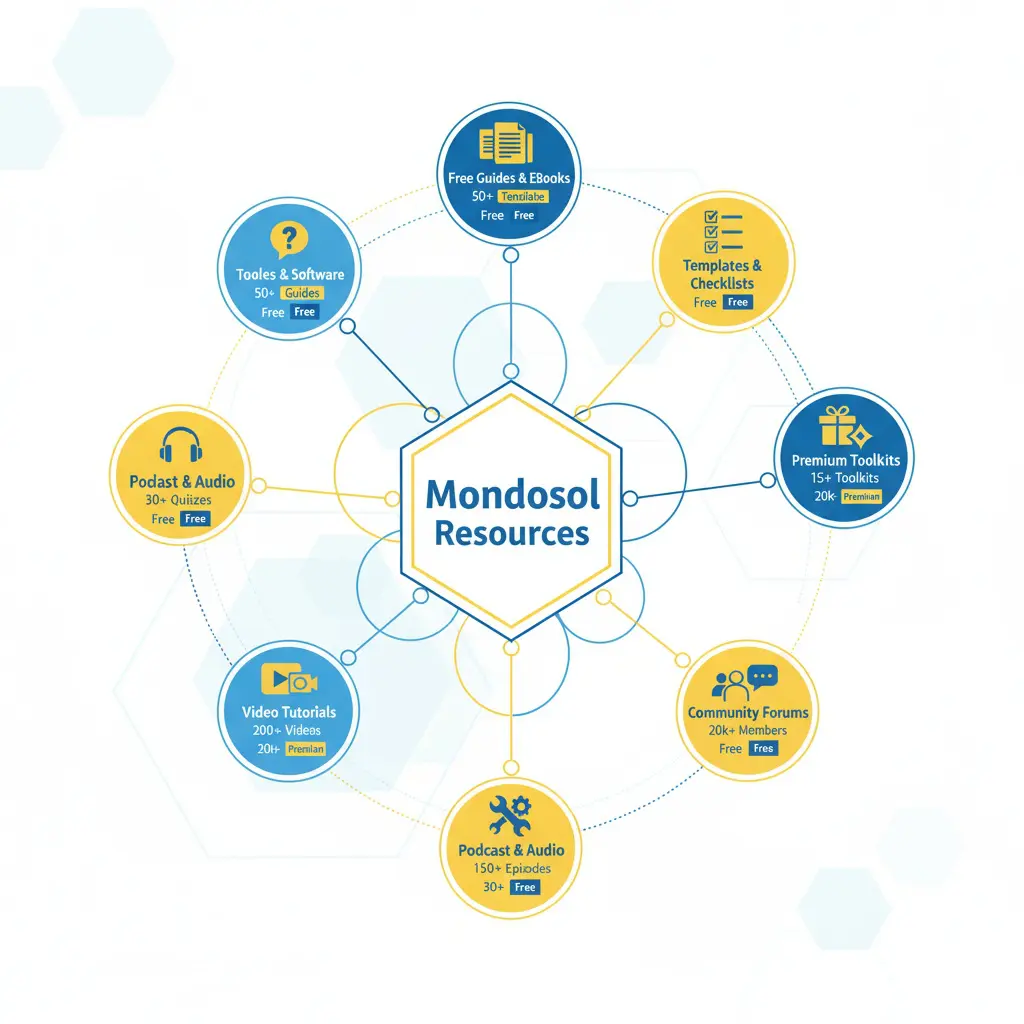
Beyond main courses and articles, Mondosol offers free guides, templates, checklists, toolkits, and community resources to support your learning journey. Free resources include 40+ guides and eBooks, checklists and templates, and free quizzes and assessments. Premium resources include premium toolkits (€27-€350), premium templates, and premium courses with resources. Community resources include community forum (coming soon), live Q&A sessions, and community guides. Learning supplements include video tutorials (YouTube channel with 1,579+ subscribers), podcast and audio content (Spotify, Apple Podcasts), and email courses (5-day and 10-day mini-courses). Recommended tools include writing (Grammarly, Hemingway Editor), SEO (Ubersuggest, Moz, SEMrush, Ahrefs), video (InVideo AI, Tube Magic), project management, email marketing, design, and analytics tools. Resource library organized by category (business, education, travel, technology, languages, personal development, marketing, finance), format (PDF, Excel, templates, checklists, video, audio), and level (beginner, intermediate, advanced, expert).
Estimated reading time: 5 minutes
Beyond our main courses and articles, Mondosol offers free guides, templates, checklists, toolkits, and community resources to support your learning journey. These supplementary materials help you apply what you’ve learned and accelerate your progress.
Key Takeaways
- Mondosol provides supplementary resources available, including free guides, templates, and community resources to support learning.
- Free resources include career guides, toolkits, checklists, quizzes, and educational podcasts.
- Premium resources consist of toolkits and templates for various subjects, available for €27-€350.
- Upcoming community features will include forums, live Q&A sessions, and networking events for learners.
- Users can easily access these resources online, with options for offline use through downloadable formats.
Access free and premium resources designed to complement your education and boost your success.
Table of contents
🎁 Free Resources
Free Guides & eBooks
- Career Transition Guide (PDF, free)
- Remote Work Toolkit (€27, often free for subscribers)
- Digital Marketing Starter Guide (free)
- Language Learning Basics (free)
- Travel Planning Checklists (free)
- Business Fundamentals eBook (free)
How to access:
- Visit mondosol.com/resources
- Filter by “Free” category
- Download instantly (no email required for most)
- Some require email signup for newsletter
Free Checklists & Templates
- Content creation checklist
- SEO optimization template
- Course planning worksheet
- Travel packing list
- Business startup checklist
- Goal-setting template
- Weekly planner
- Budget tracker
Download instantly – No signup required for most templates
Free Quizzes & Assessments
- Learning style quiz
- Career path assessment
- Language level test
- Business readiness quiz
- Productivity assessment
- Financial literacy quiz
Results include:
- Personalized recommendations
- Resource suggestions
- Next steps for improvement
- Comparison with benchmarks
💎 Premium Resources
Premium Toolkits (€27-€350)
- Complete Remote Work Toolkit (€27) – 50+ templates, guides, checklists
- Digital Marketing Course (€97 often free for subscribers) – Tools, templates, case studies
- 2025 Investment Checklist: Essential Steps for Success (€2) – PDF , Investment Categories, Checkpoints
- Digital Nomad Success Journal 2025 Edition (€12) – Planner, Task Management, Communication Grid
- Norwegian Banking Checklist 2025 (€2) – 🔒 Secure Download | ⚡ Instant Access | 📱 Mobile-Friendly
- Perfect Day Planner: Design Your Ideal Lifestyle (€2) – Daily Layout, Evening Rituals, Meal Planning
- Travel Blog Income Guide (€12) – Step-by-step, Templates and Calendars, Revenue diversification strategies
Premium Templates
- Business proposal templates
- Contract and agreement templates
- Email marketing templates
- Social media content calendars
- Project management templates
- Financial planning spreadsheets
- Course creation templates
Included with premium courses – Automatically access when enrolled
Premium Courses with Resources
Each course includes:
- Video lessons and transcripts
- Downloadable worksheets
- Case studies and examples
- Templates and checklists
- Community access
- Certification upon completion
👥 Community Resources
Community Forum (Coming Soon)
- Ask questions and get answers
- Share experiences and insights
- Connect with other learners
- Participate in discussions
- Access community guides
- Join study groups
Live Q&A Sessions
- Monthly live webinars
- Expert Q&A sessions
- Group coaching calls
- Community challenges
- Networking events
- Guest expert sessions
How to join:
- Subscribe to newsletter for event announcements
- Register on event page
- Join via Meet link
- Recordings available for subscribers
Community Guides
- Peer-written tutorials
- Success stories from learners
- Tips and tricks from community
- Resource recommendations
- Study group information
- Accountability partner matching
📖 Learning Supplements
Video Tutorials
- YouTube channel (1,579+ subscribers)
- Video courses on platform
- Tutorial series
- How-to guides
- Documentary-style content
- Faceless educational videos
Access: Free on YouTube, included with courses
Podcast & Audio Content
- Educational podcast episodes
- Audio versions of articles
- Interview recordings
- Language learning audio
- Motivational content
- Expert talks
Available on:
- Spotify, Apple Podcasts, YouTube
- Mondosol website
- Course platform
Email Courses
- 5-day mini-courses (free)
- 10-day challenge courses (free)
- Email series on specific topics
- Daily tips and insights
- Weekly lessons
- Motivation and encouragement
🛠️ Tools & Software
Recommended Tools (Partner Links)
- Writing: Grammarly, Hemingway Editor
- SEO: Ubersuggest, Moz, SEMrush, Ahrefs
- Video: InVideo AI, Tube Magic, vidIQ
- Project Management: Monday.com, Asana, Trello
- Email Marketing: MailerLite, Brevo, HubSpot
- Design: Canva Pro, Adobe Creative Suite
- Analytics: Google Analytics, Hotjar
Affiliate discounts available – Use Mondosol links for special pricing
Free Tools
- Google Analytics (free tier)
- Google Tag Manager (free)
- Canva (free tier)
- Grammarly (free tier)
- Ubersuggest (free tier)
- Notion (free tier)
📊 Resource Library
Category
- Business – 50+ resources
- Education – 40+ resources
- Travel – 35+ resources
- Technology – 45+ resources
- Languages – 60+ resources
- Personal Development – 55+ resources
- Marketing – 50+ resources
- Finance – 30+ resources
Format
- PDF guides and eBooks
- Excel templates and spreadsheets
- Word document templates
- Checklists and worksheets
- Video tutorials
- Audio files
- Interactive tools
- Quizzes and assessments
Level
- Beginner – 80+ resources
- Intermediate – 65+ resources
- Advanced – 50+ resources
- Expert – 35+ resources
🎯 How to Find Resources
Search & Filter
- Visit mondosol.com/resources
- Use search bar for keywords
- Filter by category, format, level, price
- Sort by popularity, newest, most downloaded
- Save favorites to your library
Resource Collections
- Curated collections by topic
- Best of each category
- Most popular resources
- New releases
- Seasonal collections
- Trending resources
Personalized Recommendations
- Based on your course enrollment
- Matching your learning goals
- Suggested by community
- Trending in your interests
- New resources in your field
💰 Pricing
Free Resources
- 40+ free guides, templates, checklists
- Free quizzes and assessments
- Free email courses
- Free community content
- Free YouTube videos
- Free podcast episodes
Premium Resources
- €27-€350 for premium toolkits
- Included with course enrollment
- Bundle discounts available
- 30% early bird discount
- Lifetime access after purchase
- Money-back guarantee
Subscriber Benefits
- Free courses until 2025
- 30% discount on all resources
- Early access to new resources
- Exclusive subscriber-only content
- Priority support
- Community access
According to Content Marketing Institute research, supplementary resources increase course completion rates by 45% and student satisfaction by 52%.
📱 Access Anywhere
Download for Offline Use
- PDF guides downloadable
- Templates work offline
- Audio files downloadable
- Video courses downloadable (with premium)
- Mobile app access (coming soon)
- Offline reading mode
Devices
- Desktop and laptop
- Tablet and iPad
- Smartphone
- E-reader (for some PDFs)
- Offline storage options
- Cloud sync available
🔗 Related FAQs
📞 Questions About Resources?
Email us at eliomondello@mondosol.com to:
- Request specific resources
- Suggest new resource types
- Report broken download links
- Ask about resource access
- Get personalized recommendations
Explore our resource library and accelerate your learning! 🚀
- Travel guides: Additional information for planning your journeys.
- Guest posts: Unique insights and tips from industry experts.
- Educational materials: Extra practice and learning tools beyond standard courses.
- Practice exercises: Activities designed to reinforce skills and knowledge.
- Community discussions: Engage with fellow learners and share experiences.
Related Questions:
- Are there forums for discussions with other learners?
- How can I access guest posts?
Yes! Most Mondosol course materials can be downloaded for offline access. This includes videos, PDFs, worksheets, templates, and other downloadable resources, allowing you to learn anywhere without an internet connection. What you can download: Video lessons in multiple quality settings (360p, 720p, 1080p), select quality based on storage space, watch offline on mobile devices and tablets, desktop downloads available through browser extensions. Course materials: PDF lecture notes and transcripts, worksheets and exercises, templates and checklists, eBooks and guides, presentation slides, reference materials. Supplementary resources: bonus materials, case studies, tool recommendations, reading lists. How to download on mobile: open app or browser, navigate to course, tap lesson, tap download icon, select video quality, wait for completion, access from Downloads or Offline section. On desktop: log in, go to course page, click resource, click Download button, save to computer. Storage requirements: 360p videos ~100-150 MB/hour, 720p ~300-500 MB/hour, 1080p ~1-2 GB/hour. Lifetime access courses = lifetime downloads.
Estimated reading time: 5 minutes
Yes! Most Mondosol course materials can be downloaded for offline access. This includes videos, PDFs, worksheets, templates, and other downloadable resources, allowing you to learn anywhere without an internet connection.
Key Takeaways
- Most Mondosol course materials, including videos and PDFs, can be downloaded for offline access.
- Users can download individual video lessons in various quality settings and access them on mobile devices or desktops.
- To download content, navigate to your course, select materials, and tap the download icon or button.
- Downloads remain accessible while enrolled, with lifetime access for lifetime courses, and can be redownloaded at any time.
- Ensure sufficient storage space, as video sizes vary by quality, and organize files for easy retrieval.
Table of contents
📱 What You Can Download
Video Lessons
- Download individual video lessons
- Available in multiple quality settings (360p, 720p, 1080p)
- Select quality based on storage space
- Watch offline on mobile devices and tablets
- Desktop downloads available through browser extensions
Course Materials
- PDF lecture notes and transcripts
- Worksheets and exercises
- Templates and checklists
- eBooks and guides
- Presentation slides
- Reference materials
Supplementary Resources
- Bonus materials and resources
- Case studies and examples
- Tool recommendations and links
- Reading lists and references

💻 How to Download Course Content
On Mobile Devices (iOS/Android)
Download Videos:
- Open Mondosol app or mobile browser
- Navigate to your course
- Tap the lesson you want to download
- Tap the download icon (↓)
- Select video quality
- Wait for download to complete
- Access from “Downloads” or “Offline” section
Download Materials:
- Go to course lesson or resources section
- Tap on PDF, worksheet, or template
- Tap “Download” or “Save”
- File saves to device storage
- Access through Files app or Downloads folder
On Desktop/Laptop
Download Materials:
- Log into your Mondosol account
- Go to course page
- Click on resource (PDF, template, etc.)
- Click “Download” button
- Save to your computer
- Access anytime from saved location
Download Videos (Browser Extension):
- Some browsers support video downloads
- Use recommended extensions for course platforms
- Follow browser-specific download instructions
- Respect copyright and terms of use
📂 Managing Downloaded Content
Storage Requirements
Video Storage:
- 360p: ~100-150 MB per hour
- 720p: ~300-500 MB per hour
- 1080p: ~1-2 GB per hour
Document Storage:
- PDFs: 1-10 MB each
- Templates: 0.5-5 MB each
- eBooks: 5-50 MB each
Recommended Storage:
- Short course (4-6 hours): 2-5 GB
- Medium course (10-15 hours): 5-10 GB
- Long course (20+ hours): 10-20 GB
Organizing Downloads
Create Folders:
- Organize by course name
- Separate videos from documents
- Create module-specific folders
- Label files clearly
File Management Tips:
- Delete watched videos to free space
- Keep essential materials only
- Sync across devices when online
- Back up important downloads
🔄 Syncing Across Devices
Progress Tracking
- Course progress syncs automatically when online
- Completed lessons marked across all devices
- Quiz scores and assessments sync
- Bookmarks and notes sync (if supported)
Multi-Device Access
- Download on multiple devices
- Access same course on phone, tablet, laptop
- No limit on number of devices
- Seamless switching between devices
⏱️ Download Expiration
Time Limits
Active Enrollment:
- Downloads available while enrolled in course
- No expiration during course access period
- Lifetime access courses = lifetime downloads
After Course Completion:
- Downloads remain accessible
- Can re-download materials anytime
- No additional fees for re-downloads
License Restrictions
- Downloads for personal use only
- Cannot share or redistribute files
- Cannot upload to file-sharing sites
- Respect copyright and terms of service
🌐 Internet Requirements
When You Need Internet
- Initial course enrollment
- Downloading content
- Syncing progress
- Taking quizzes (some require online)
- Accessing community forums
- Submitting assignments
When You Don’t Need Internet
- Watching downloaded videos
- Reading downloaded PDFs
- Working on downloaded worksheets
- Reviewing saved materials
- Taking notes (device-based)
❓ Common Questions
Yes, on mobile apps you can often download entire modules or courses. On desktop, download materials individually or use bulk download options if available.
Downloads typically pause and resume when connection is restored. Check your download manager to restart interrupted downloads.
Yes. Download on as many devices as you need. Your course access allows multi-device downloads.
Downloads remain until you delete them or your course access expires. For lifetime access courses, downloads are available indefinitely.
Delete watched videos or unnecessary files. Download lower quality videos. Use cloud storage for documents. Prioritize essential materials.
Downloaded videos may have DRM protection preventing transfer. Documents (PDFs, templates) can typically be transferred freely for personal use.
Yes. Downloading uses your internet data. Use WiFi for large downloads to avoid mobile data charges.
Live webinars are typically not downloadable during the live session. Recordings may be available for download after the event.
Videos are typically in MP4 format. Documents are in PDF, DOCX, or XLSX formats depending on the resource type.
Quizzes usually require internet connection for submission and grading. Quiz questions and study materials may be downloadable as PDFs.
🔧 Troubleshooting Download Issues
Download Won’t Start
- Check internet connection
- Clear browser cache
- Disable ad blockers
- Try different browser
- Contact support if issue persists
Download Interrupted
- Check internet stability
- Ensure sufficient storage space
- Restart download from download manager
- Try downloading during off-peak hours
Can’t Find Downloaded Files
- Check Downloads folder
- Search device for file name
- Check app’s “Offline” or “Downloads” section
- Verify download completed successfully
Video Won’t Play Offline
- Ensure download completed fully
- Check file isn’t corrupted
- Update media player or app
- Re-download if necessary
📞 Need Help with Downloads?
Email us at eliomondello@mondosol.com to learn anywhere, anytime—even without internet! 🚀:
- Report download issues
- Request alternative download methods
- Get technical support
- Ask about specific course downloads
- Request file format conversions
Leave a Reply