
📚 Mondosol Help Center
Find answers to all your questions about our coaching, courses, and services
Business & Coaching
Master global business success through expert multilingual coaching and the Power Hour Method
1 articleLearning & Education
Master languages faster through cultural immersion and innovative education approaches
11 articlesTravel & Accommodation
Professional travel and accommodation services for educational experiences
16 articlesBooking & Reservations
Streamline your booking and reservation experience with expert guidance
13 articlesGuest Posting
Share your expertise in travel, education, and personal development
6 articlesAffiliate Program
Join our lucrative affiliate program with 50% commissions and €2 sign-up bonus
Coming soonPricing & Payments
Transparent pricing structure for all educational services
1 articlePlatform & Support
Comprehensive support for account management and technical assistance
1 articleAbout Mondosol
Discover our mission to transform global learning through innovative education
Coming soon🔥 Most Popular Questions
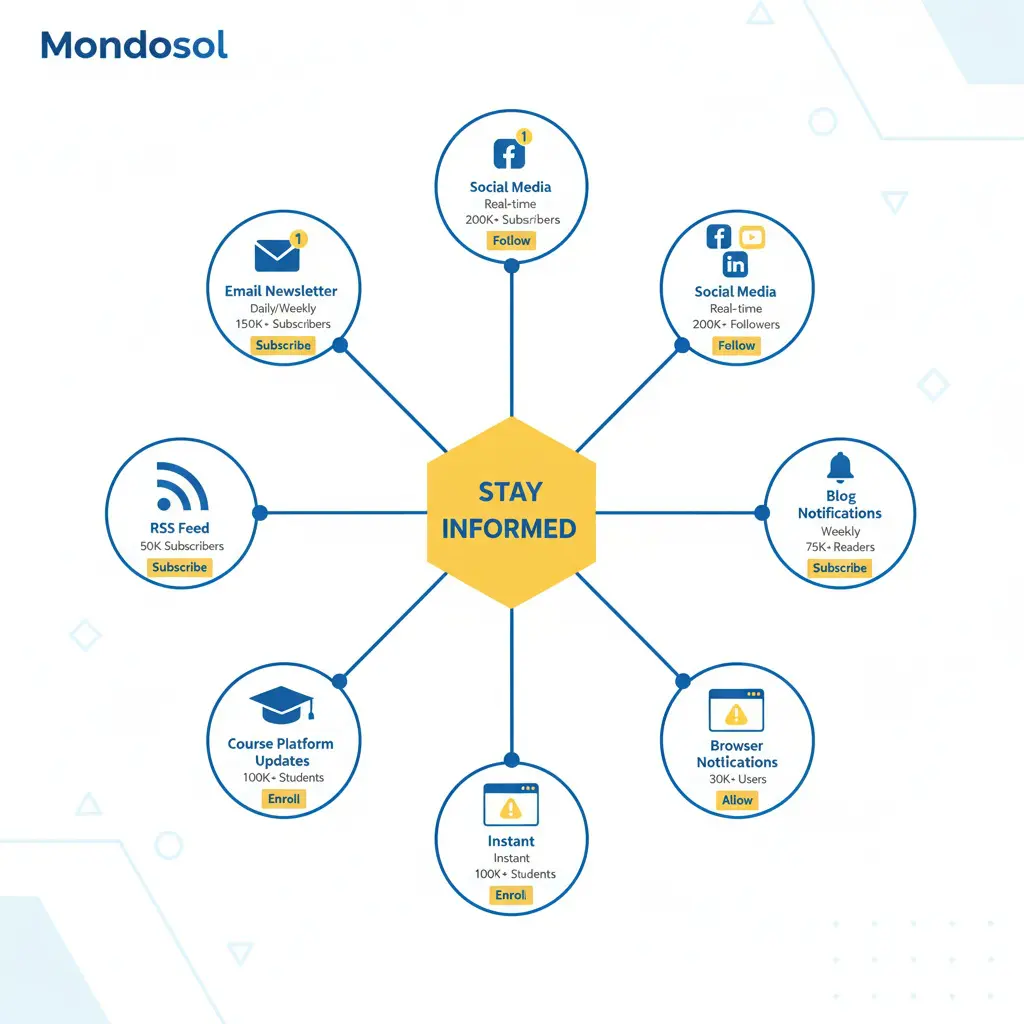
Stay connected with Mondosol through multiple notification channels. Subscribe to our email newsletter for weekly updates on new courses, articles, and resources. Follow us on social media (Facebook, Instagram, LinkedIn, YouTube) for daily tips, announcements, and community engagement. Enable RSS feed notifications to automatically receive updates in your feed reader. Turn on blog notifications to get alerts whenever new articles are published. Enable course platform notifications for new lessons, course launches, and community discussions. Set up browser notifications for real-time alerts on important announcements. Customize your notification preferences in your account settings. Choose which channels work best for you—email, social, RSS, browser, or a combination. Unsubscribe anytime if you prefer fewer notifications. All notification channels are free and optional. Mondosol respects your privacy and never shares your email or personal information. Manage notification frequency and content types in your preferences.
Estimated reading time: 6 minutes
Stay connected with Mondosol through multiple notification channels. Subscribe to our email newsletter for weekly updates on new courses, articles, and resources. Follow us on social media for daily tips and announcements. Enable RSS feeds, blog notifications, or browser alerts to never miss important updates.
Key Takeaways
- Stay informed about new content through multiple notification channels like email newsletters, social media, and blog alerts.
- Subscribe to the email newsletter for weekly updates, exclusive content, and special offers directly to your inbox.
- Follow Mondosol on Facebook, Instagram, LinkedIn, and YouTube for daily tips and community engagement.
- Use RSS feeds to get automatic updates or enable browser notifications for real-time alerts on important announcements.
- Customize your preferences easily by managing notifications in your account settings, ensuring you receive the content you want.
Choose the notification channels that work best for you and customize your preferences anytime.
Table of contents
📧 Email Newsletter
Subscribe to Our Newsletter
Get weekly updates delivered directly to your inbox featuring:
- New course launches and updates
- Latest articles and guides
- Exclusive subscriber-only content
- Special offers and discounts
- Community highlights and success stories
- Expert tips and insights
How to subscribe:
- Visit mondosol.com
- Scroll to footer or signup form
- Enter your email address
- Confirm subscription in your email
- Start receiving updates immediately
Frequency: Weekly digest (Fridays)Content: Curated selection of new content, resources, and announcementsUnsubscribe: One-click unsubscribe link in every email
📱 Social Media
Follow Us on All Platforms
Facebook (8,700+ followers)
- Daily tips and insights
- New article announcements
- Community engagement and discussions
- Live Q&A sessions
- Event announcements
- Follow on Facebook
Instagram (4,500+ followers)
- Visual tips and inspiration
- Behind-the-scenes content
- Student success stories
- Quick learning tips
- Course updates
- Follow on Instagram
LinkedIn (2,100+ followers)
- Professional insights
- Business and career tips
- Industry news and trends
- Thought leadership content
- Networking opportunities
- Follow on LinkedIn
YouTube (1,579+ subscribers)
- Video tutorials and courses
- Educational content
- Expert interviews
- Documentary-style videos
- How-to guides
- Subscribe on YouTube
Enable notifications on each platform to get alerts when we post new content.
🔔 Blog Notifications
Get Alerts for New Articles
Enable blog notifications to receive alerts whenever we publish new articles:
- Visit mondosol.com/blog
- Click “Subscribe to Blog” button
- Choose notification frequency (daily, weekly, or as published)
- Confirm your email
- Start receiving blog update notifications
What you’ll get:
- Instant alerts for new blog posts
- Article summaries and links
- Category-specific notifications (optional)
- Digest emails with multiple articles
Frequency options:
- As published – Get notified immediately
- Daily digest – One email per day with all new posts
- Weekly digest – One email per week with all new posts
📡 RSS Feed
Use an RSS Reader
Subscribe to our RSS feed for automatic content updates in your preferred feed reader:
RSS Feed URL: mondosol.com/feed
Popular RSS readers:
- Feedly (web and mobile)
- Inoreader (web and mobile)
- The Old Reader (web)
- Newsblur (web and mobile)
- Apple News (iOS)
- Google Podcasts (audio feeds)
How to subscribe:
- Copy the RSS feed URL
- Open your RSS reader
- Click “Add Feed” or “Subscribe”
- Paste the URL
- Start receiving updates automatically
Benefits:
- Automatic updates without email
- Organize content by category
- Read on your own schedule
- No spam or promotional content
- Privacy-focused (no email required)
🌐 Browser Notifications
Enable Desktop Alerts
Turn on browser notifications to receive real-time alerts about important announcements:
How to enable:
- Visit mondosol.com
- Click notification bell icon (top right)
- Click “Enable Notifications”
- Confirm in your browser settings
- Start receiving alerts
What triggers notifications:
- New course launches
- Important announcements
- Live Q&A session reminders
- Special offers and promotions
- Community highlights
- System updates
Manage notifications:
- Customize notification types in settings
- Choose notification frequency
- Disable anytime in browser settings
- Mute notifications during specific hours
🎓 Course Platform Notifications
Stay Updated on Your Courses
If you’re enrolled in courses, enable platform notifications for:
- New lessons and course updates
- Assignment reminders and deadlines
- Community discussion replies
- Instructor announcements
- Course completion milestones
- Certificate availability
How to enable:
- Log into your course account
- Go to Settings → Notifications
- Choose which alerts you want
- Select notification method (email, in-app, or both)
- Save your preferences
Notification types:
- Course updates – New lessons, materials, changes
- Community – Replies to your posts, mentions
- Assignments – Reminders, deadlines, feedback
- Announcements – Instructor messages, important info
- Milestones – Progress updates, achievements
⚙️ Customize Your Preferences
Manage All Notifications
Control exactly what notifications you receive and how often:
In your account settings:
- Log into your Mondosol account
- Go to Settings → Notifications
- Choose your preferences:
- Email frequency (daily, weekly, never)
- Content types (courses, articles, announcements)
- Notification channels (email, SMS, push)
- Quiet hours (no notifications during specific times)
- Save changes
Notification preferences:
- Email – Choose frequency and content types
- Social media – Enable platform notifications
- Blog – Daily, weekly, or instant alerts
- Browser – Real-time desktop alerts
- Course platform – In-app and email alerts
- SMS (optional) – Text message alerts for urgent announcements
Unsubscribe anytime:
- One-click unsubscribe link in every email
- Disable notifications in account settings
- Turn off browser/push notifications anytime
- No penalty for unsubscribing
🔒 Privacy & Communication
We Respect Your Privacy
- ✅ Never share your email with third parties
- ✅ No spam or unwanted promotional content
- ✅ GDPR compliant and secure
- ✅ Unsubscribe anytime with one click
- ✅ Control exactly what you receive
- ✅ Encrypted communication channels
Email frequency:
- Newsletter: 1x per week (Fridays)
- Blog updates: As published, daily, or weekly
- Course notifications: Only when enrolled
- Announcements: Only for important updates
- Promotional: Optional (can disable)
Your data:
- Email address is encrypted and secure
- Never sold or shared
- Used only for Mondosol communications
- Deleted upon request
- GDPR and privacy law compliant
📊 Notification Channels Comparison
| Channel | Frequency | Content | Effort | Best For |
|---|---|---|---|---|
| Email Newsletter | Weekly | Curated updates | Low | Comprehensive updates |
| Social Media | Daily | Tips, announcements | Low | Quick updates, engagement |
| Blog Notifications | Instant/Daily/Weekly | Articles only | Low | Blog readers |
| RSS Feed | Automatic | All content | Medium | Feed reader users |
| Browser Notifications | Real-time | Important only | Low | Urgent announcements |
| Course Platform | As needed | Course-specific | Low | Active students |
❓ Common Questions
Our newsletter is sent once per week (Fridays). Blog notifications can be instant, daily, or weekly based on your preference.
Yes! Every email has a one-click unsubscribe link. You can also disable notifications in your account settings.
No. We send only curated, valuable content. No spam, no third-party promotions. Unsubscribe anytime if you prefer fewer emails.
Yes. Customize your preferences in account settings to choose content types, frequency, and notification channels.
Absolutely. Your email is encrypted, never shared with third parties, and used only for Mondosol communications.
All content is also available on our website, blog, and social media. You can browse anytime without notifications.
Yes. Enable browser notifications on mobile, follow us on social media apps, or subscribe to RSS feeds on mobile apps.
Log into your account → Settings → Notifications. Customize frequency, content types, and channels.
🔗 Related FAQs
- What supplementary resources are available?
- How often is content updated?
- How do I access learning resources?
📞 Questions About Staying Informed?
Email us at eliomondello@mondosol.com to:
- Report notification issues
- Request specific content types
- Suggest new notification channels
- Ask about notification preferences
- Update your contact information
Stay connected and never miss an update! 🚀
- Account dashboard notifications:
Get alerts on new course launches directly in your profile.
- Email updates:
Subscribe to newsletters for the latest information delivered to your inbox.
- Course announcements:
Immediate updates provided within course pages to keep you in the loop.
- Platform news section:
A dedicated area for the latest news and updates on the platform.
- Social media channels:
Follow us for real-time updates and community engagement.
Leave a Reply